
Last Updated: July 2026
Tamil summary available below (தமிழ் சுருக்கம் கீழே உள்ளது).
Quick Answer
Yes — you can apply online to extend your Sri Lanka tourist visa before your current period of stay expires. Depending on approval, tourists may be able to remain in Sri Lanka for up to 270 days. Apply early to avoid overstay penalties or travel disruptions.
If you want to extend your Sri Lanka ETA online, you must apply before your current visa expires.
Not sure when your visa actually expires? Understand validity vs stay period → See guide
Action Hook
Not sure how long you can stay?
Check your last legal stay date → Visa Overstay Calculator

Travelers who enter Sri Lanka with an approved Tourist ETA are generally granted an initial period of stay of up to 30 days. If they wish to remain longer, they must apply for a visa extension before their permitted stay expires.
Sri Lanka allows tourists to extend their stay beyond the initial ETA period through the online visa extension system managed by the Department of Immigration & Emigration.
Many travellers successfully apply for a Sri Lanka visa extension online, but some face unexpected issues at the airport such as missing confirmations or payment failures.
This guide explains how to extend your Sri Lanka ETA online and what travelers should know about the process.
Your stay starts from the moment you enter Sri Lanka at the airport. What happens after arrival in Sri Lanka
Applied a new ETA instead of extending your visa? This is a common mistake:
Applied New Sri Lanka ETA Instead of Extension Guide
How to Extend Your Visa (Quick Steps)
- Go to visa extension portal
- Enter passport details
- Upload required documents
- Pay extension fee
- Wait for approval
How to Extend Sri Lanka ETA Online
Step 1 — Visit the Visa Extension Portal
Go to the Sri Lanka online visa extension portal and select Tourist Visa Extension.
Start a new application using your passport details.
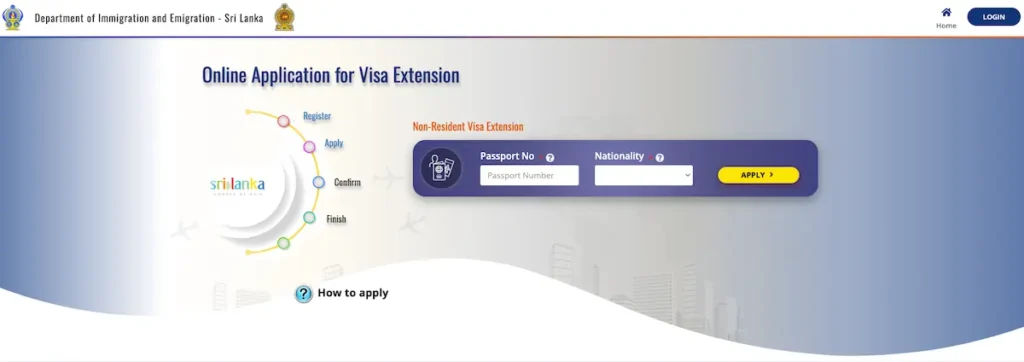
Make sure you are using the official Sri Lanka immigration website when applying for a visa extension.
Step 2 — Login or Register to Continue
After entering your passport number and nationality, you will be redirected to the login page.
• If you already have an account, log in using your email address and password
• If you are a new user, click the “Register” button and create an account
Make sure to use a valid email address, as important updates about your visa extension will be sent there.
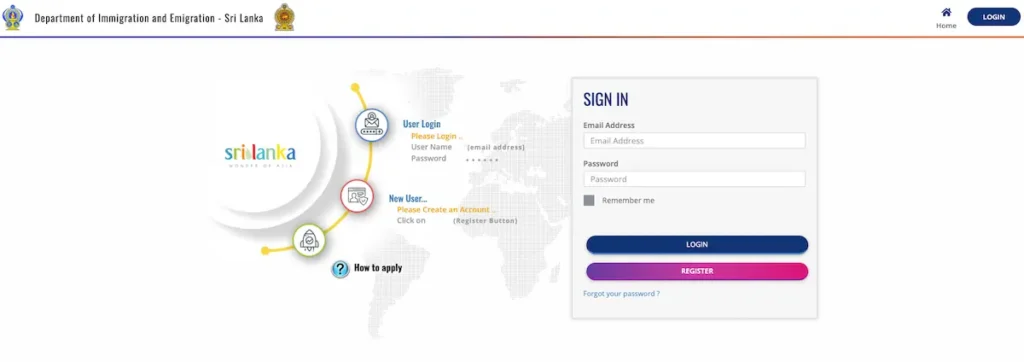
If you forget your password, use the password reset option on the login page instead of creating a new account.
Step 3 — Complete the Application Form & Upload Documents
After logging in, you will be asked to complete the visa extension application form.
You typically need to provide:
• Personal details (as per passport)
• Current address in Sri Lanka
• Contact details (email and phone number)
• Reason for extending your stay
You may also need to upload supporting documents such as:
• Passport biodata page
• Current visa or ETA approval
Make sure all information matches your passport exactly to avoid delays.
The exact fields may vary slightly depending on your nationality and visa type.
Step 4 — Pay the Visa Extension Fee
The visa extension fee depends on:
• Your nationality
• Length of the requested extension
Payments are usually made online using a card through the payment gateway.
If your payment fails during extension, don’t panic — see full fix guide:
Sri Lanka Visa Extension Payment Failed? What to Do & Pay at Airport Option (2026 Guide)
Step 5 — Wait for Immigration Approval
After submitting the application:
• Immigration officers review the request
• You will usually receive updates by email
• Once approved, your visa extension confirmation will be issued
Always keep copies of your application and payment records.
Processing Time & Fees
- Processing time: Usually a few days (varies)
- Fees depend on nationality and duration
- Payment is made online
Important Things for Visa Extension
Based on common situations handled at Sri Lankan airports, travelers should be aware of the following practical points.
If You Applied Online but Did Not Receive Confirmation
If issues occur, immigration officers may verify your application during departure. Always keep payment proof and confirmation emails.
If the Payment Gateway Failed During Application
If you applied for a visa extension before your visa expired but the payment failed:
• You may be able to pay the extension fee at departure
• Overstay penalties usually do not apply
• You must have submitted the application before expiry
👉 Keep your application reference or email as proof.
👉 For full steps and what to do next, see:
Sri Lanka Visa Extension Payment Failed Guide
What If Your Visa Has Already Expired?
If your tourist visa has already expired, Sri Lanka normally allows a short grace period before overstay penalties apply.
Use this Sri Lanka Visa Stay & Overstay Fine Calculator.
If you leave the country within this period, penalties usually do not apply, but you may still need to pay the visa extension fee at departure.
If your passport is lost during your stay, follow this guide immediately:
→ Lost Passport Guide
How Long Can You Extend a Sri Lanka Tourist Visa?
Typical tourist visa extension structure:
• Initial ETA: 30 days
• First extension: 60 days
• Second extension: 90 days
• Third extension: 90 days
Maximum stay can reach 270
Common Visa Extension Mistakes
• Waiting until the visa is already expired to apply
• Entering incorrect passport details in the extension application
• Ignoring emails from the immigration system
• Not saving payment confirmation or application records
It is always best to apply for the extension before the visa expires.
Still Need Help?
Refer Sri Lanka Visa Help Hub
If your visa has already expired, check your overstay risk → Use the Overstay Calculator
Need to apply ETA again? → Apply Guide
Related Guides
• Sri Lanka Visa Overstay Grace Period (7 Days): What Travellers Should Know
• How to Apply for Sri Lanka ETA Online
• Made a Mistake in Your Sri Lanka ETA? Fix Guide
தமிழ் சுருக்கம் (Tamil Summary)
• ETA மூலம் இலங்கைக்கு வரும் பயணிகள் பொதுவாக 30 நாட்கள் தங்க அனுமதி பெறுவார்கள்
• இந்த விசாவை online visa extension system மூலம் நீட்டிக்கலாம்
• பொதுவாக 270 நாட்கள் வரை தங்க முடியும்
• extension apply செய்யும்போது payment confirmation வைத்திருக்க வேண்டும்
• payment பிரச்சினை ஏற்பட்டால், விண்ணப்ப விவரங்களையும் ஆதாரங்களையும் பாதுகாத்து வைத்து, குடிவரவு துறையை தொடர்புகொள்ளுங்கள்.
• visa காலாவதியாகும் முன்பே extension-க்கு விண்ணப்பிப்பது பாதுகாப்பானது. காலாவதியானால் உடனடியாக குடிவரவு துறையை தொடர்புகொள்ளுங்கள்.
Disclaimer
The information provided is for general guidance only and may change without notice. This website is an independent informational platform and is not affiliated with the Sri Lankan government. Always verify details with official authorities.